You open your gallery to find one photo, and end up scrolling through hundreds. The same picture was saved twice. Five similar selfies. Screenshots you needed once but never deleted. It keeps going. Your phone doesn’t get messy in one day. It happens slowly. A download here, a share there, a quick screenshot you forget about. Before you realise it, your storage is full, and your gallery feels overwhelming. Finding one important photo starts taking longer than it should. And the worst part? Cleaning it feels like a chore. No one wants to sit and compare similar photos one by one. That’s exactly why photo cleanup apps exist. They scan your gallery, group duplicates and similar images, and let you clean everything in a few taps. If your gallery feels crowded and your storage is running low, these apps can make a big difference. Here are five of the best Android apps that help you clean your photos without the stress.
1. PictureEcho (Android)
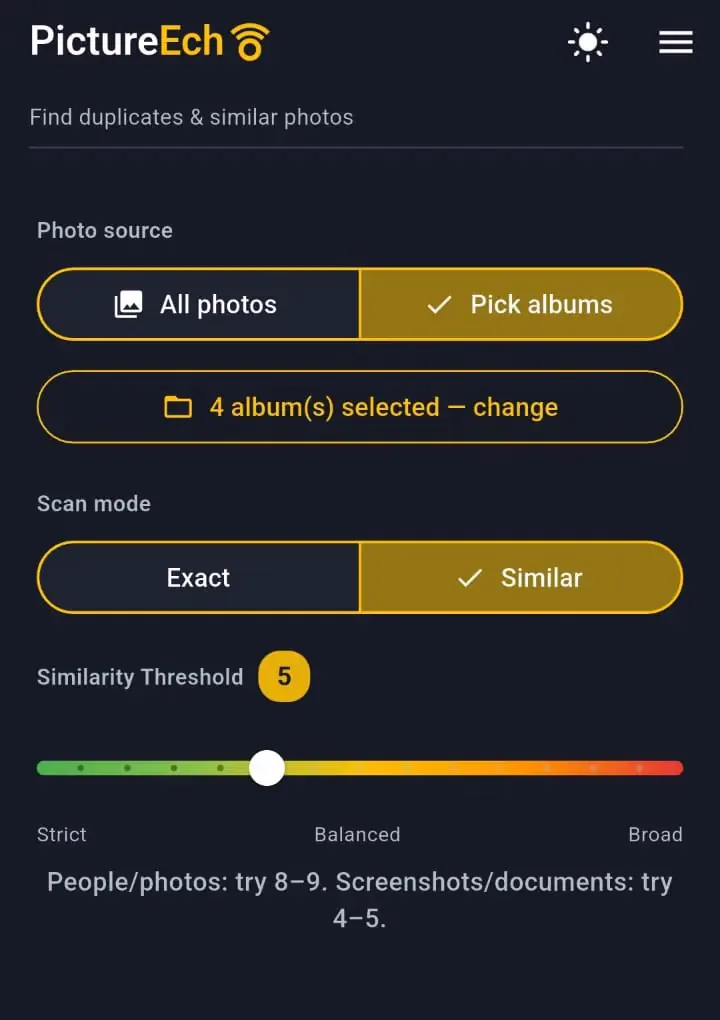
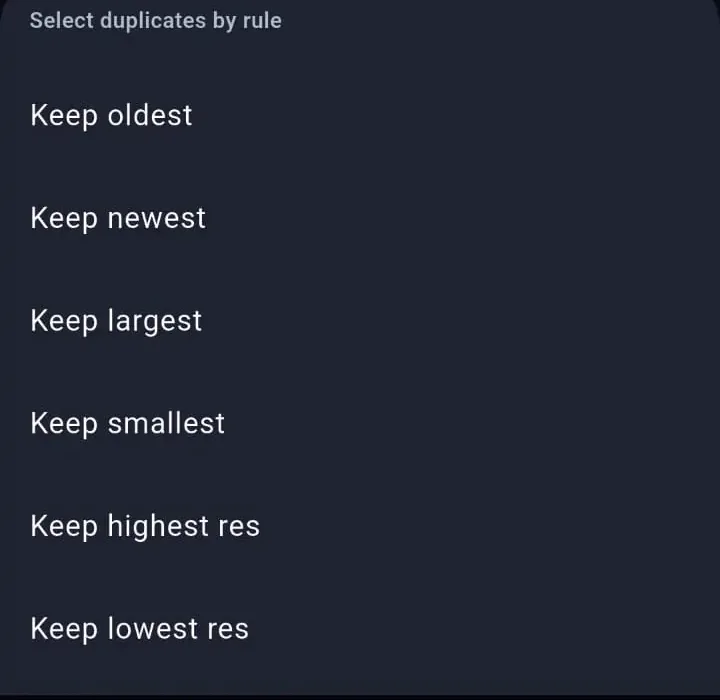
PictureEcho finds exact and similar photos that are already on the phone. Exact and Similar are separate scans. Similar is the one that shows a threshold, from Strict to Broad. The hint on that screen is 8–9 for people and photos, and 4–5 for screenshots and documents. The slider in the screenshot below is sitting at 5, which is just that capture, not the setting to copy for a camera roll. You can scan all photos, or only the albums you pick. The photos stay on the device.Similar is selected, so the threshold is on screen. Exact hides it.The scan comes back as groups. Select Duplicates can mark the extras by oldest, newest, largest, smallest, highest resolution, or lowest resolution. Those are choices you make, and you can change the selection before anything is removed. Delete permanently cannot be undone, and Android may ask you to confirm again.The six keep rules are listed. You pick one, then review the selection.
2. Remo Duplicate Photos Remover
Remo is a popular choice for Android users who want a quick and easy way to remove duplicate photos. The app scans your device and groups similar and identical images together so you don’t have to search manually. It is very straightforward to use. You run a scan, review the results, and delete unwanted photos. The app also suggests which images to keep, which helps save time.Key things you can do:
Find duplicate and similar images
Review grouped photos easily
Remove duplicates in one tap
Clean large galleries without effort
If you are looking for something simple that works without too many steps, Remo is a reliable option.
3. MultCleaner
MultCleaner is built as a full storage cleaning tool that helps you manage clutter across your phone and cloud accounts in one place. Instead of cleaning things separately, everything comes into a single dashboard, which makes the whole process easier to handle.Inside the app, you can:
Find duplicate and similar photos with clear grouping
Filter files by size, date, name, or type
Preview everything before taking any action
Remove multiple items in bulk with a single click
Clean Gmail, Google Drive, Dropbox, and other cloud storage accounts
What makes MultCleaner stand out is how much control it gives you. You are not guessing what to delete. You see every file clearly, along with details like size and date, before making a decision. This reduces mistakes and makes cleaning feel safe. It also helps you go beyond just photos. Many users store large files, old emails, backups, and repeated documents across different platforms. MultCleaner brings all of this together, so you can clean everything without switching between apps.Another strong point is time saving. Instead of opening multiple apps and checking folders one by one, you can filter everything in seconds and remove what you don’t need in bulk. Even large cleanups become quick and manageable.
4. Duplicate Photos Fixer Pro
Duplicate Photos Fixer Pro is a good option if you want more control over how your photos are scanned. The app lets you choose specific folders and adjust how it detects similar images.It is useful for people who want a deeper cleanup rather than a quick scan. You can fine-tune results and review duplicates carefully before deleting them.Features include:
Detection of exact and similar duplicates
Folder-specific scanning
Adjustable scan settings
Grouped results for easy review
This app is helpful if you like to be more precise with your cleanup process.
5. CCleaner (Android)
CCleaner is known for cleaning storage and improving performance. It also includes a feature to find duplicate files, including photos.While it is not only focused on images, it still does a good job of clearing unnecessary files from your device.What it offers:
It is a good choice if you want one app that handles more than just photos.
How to Choose the Right App?
Not every app works the same way, so the best choice depends on what you need.
If you want exact and similar photos grouped on the phone, PictureEcho is built for that.
If you want something quick and simple, Remo is easy to use.
If you prefer using built-in tools, Files by Google is enough for basic cleanup.
If you want more control and detailed scanning, Duplicate Photos Fixer Pro works well.
If you want an all-in-one cleaner, CCleaner is a good choice.
Final Thoughts
Photo clutter is something almost every Android user deals with. It builds up slowly, but over time, it starts affecting your storage, your phone speed, and even how easily you can find your photos. The good thing is, you don’t need to go through everything manually anymore. Photo cleanup apps make the process much easier by scanning your gallery, grouping similar images, and helping you remove what you don’t need in just a few taps. Instead of spending hours sorting through files, you can clean your storage in a short time with better control.Each app on this list offers something useful. Some are simple and focused only on duplicate photos, while others give more control and even help with overall storage cleanup. The right choice depends on how deep you want to clean your phone and how much control you prefer. In the end, it is about making your phone feel lighter and more organized. When your photos are easy to find, and your storage is under control, everything becomes simpler. You spend less time searching and more time actually enjoying memories.